Monday, September 16, 2024

Robust messaging system in EBS

 Oracle EBS does not provide a straightforward and efficient tool for communicating important messages to users.

Currently, we have two main options for delivering actionable information to users:

  1. Create a concurrent request to generate a report for the user.
  2. Develop a workflow to send a message.

However, both methods are resource-intensive and add significant overhead to any project where they are implemented.

For the first option, a report must be developed, typically using Oracle Reports, followed by creating a BI Publisher template. This process requires a developer skilled in Oracle Reports and BI Publisher environments.

Workflows, on the other hand, are time-consuming to develop and test. Custom workflows, beyond the seeded ones, are rarely used for communication, which is unfortunate because workflow messages appear on the To-Do worklist that opens upon application login. This worklist contains all pending tasks and can serve as a checklist at the start of each workday.

Below, I outline a simple yet powerful API that enables you to transform any SQL query into a professionally formatted worklist message, offering a more efficient and user-friendly communication tool.

Here is a simple query:

   SELECT Organization_id,  organization_code org_code, calendar_code calendar, creation_date,       last_update_date

    FROM mtl_parameters

ORDER BY 2

instantly transformed into an Excel exportable worklist notification:


An this is the API call:

DECLARE

   query VARCHAR2(4000) := 

      'SELECT 

           Organization_id, 

           organization_code org_code, 

           Calendar_code calendar,

           creation_date,

           last_update_date

       FROM 

           mtl_parameters 

       ORDER BY 

           2';

BEGIN 

   XX_UNIVERSAL_WORKFLOW.start_workflow (

      p_query             => query, -- Query that will retrieve the data for the report

      p_performer         => 'PBELTER', -- Recipient of the notification, application user name from fnd_user table

      p_org_id            => 81, -- Organization ID, mainly to select the corporate logo in the report, different per company

      p_MESSAGE_TITLE     => 'Warehouse listing', -- Notification subject

      p_DOCUMENT_HEADING  => 'List of Warehouses', -- Name of the report printed in the header

      p_GENERIC_MSG_TOP   => 'Here is the list of warehouses:<br>

                              It contains the code and the calendar<br>

                              But also a date when the warehouse was created<br>

                              And when it was updated', -- Introductory message that prints before all the data. Can be in HTML

      p_GENERIC_MSG_BOTTOM => 'So now that we are done:<br>

                              ENJOY THE REST OF YOUR DAY!!' -- Summary message that prints after all the data

   );

END;


To run this you need a very simple workflow with only 1 function that delivers the message:


And the PL/QL package to run it. 

You can download the workflow form here: Download workflow


If the link doesn't work the end of document shows the detailed steps

Below you will find the PL/SQL package with detailed in-line comments and the details of how to set up your workflow. The Workflow needs to be set up only once, regardless of where you call the API from and what queries you are passing.

In the code you will find the corporate logo:
https://www.blogger.com/img/logo_blogger_40px_2x.png
Replace it with the link to your logo

You can download the package from here: Download Package

CREATE OR REPLACE PACKAGE APPS.XX_UNIVERSAL_WORKFLOW
AS

-- By Peter Belter 16-SEP-2024
   -- Define the VARIABLE_TABLE type as a table of VARCHAR2(20000)

   TYPE VARIABLE_TABLE IS TABLE OF VARCHAR2 (20000);

   -- Procedure declaration to print query columns and values

   PROCEDURE print_query_columns (p_query       IN     VARCHAR2, -- Input query to describe and print column names
                                  col_headers      OUT VARIABLE_TABLE, -- OUT parameter to hold column headers
                                  col_values       OUT VARIABLE_TABLE); -- OUT parameter to hold column values

   -- Procedure declaration for building notification body

   PROCEDURE build_ntf_body (document_id     IN            VARCHAR2,
                             display_type    IN            VARCHAR2,
                             document        IN OUT NOCOPY CLOB,
                             document_type   IN OUT NOCOPY VARCHAR2--,  query           IN            VARCHAR2
                             );

  Procedure start_workflow (p_query in varchar2, -- query that will retrieve the data for the report
  p_performer in varchar2, -- receiient of the notification, application user name from fnd_user table
  p_org_id in  number, -- organization ID, mainly to select the corporate logo in the report, different per company
  p_MESSAGE_TITLE in varchar2, -- notification subject
  p_DOCUMENT_HEADING  in varchar2, -- name of the report printed in the header
  p_GENERIC_MSG_TOP in varchar2,  -- introductory message that prints before all the data. Can be in html
  p_GENERIC_MSG_BOTTOM in varchar2 -- summary message that prints after all the data
  )    ;   


END XX_UNIVERSAL_WORKFLOW;
/
CREATE OR REPLACE PACKAGE BODY APPS.XX_UNIVERSAL_WORKFLOW
AS
-- By Peter Belter 16-SEP-2024
   PROCEDURE print_query_columns (
    p_query       IN     VARCHAR2,        -- Input query to describe and print column names
    col_headers   OUT    VARIABLE_TABLE,  -- OUT parameter to hold column headers
    col_values    OUT    VARIABLE_TABLE   -- OUT parameter to hold column values
) IS
    c                   INTEGER;           -- Cursor ID declared within the procedure
    col_count           INTEGER;           -- Number of columns in the result set
    desc_tab            DBMS_SQL.DESC_TAB2;  -- Table of column descriptions
    col_value_varchar   VARCHAR2 (20000);  -- Temporary variable to hold VARCHAR2 values
    col_value_number    NUMBER;            -- Temporary variable to hold NUMBER values
    col_value_date      DATE;              -- Temporary variable to hold DATE values
    exec_result         INTEGER;           -- Variable to store the result of execution

    -- Function to transform column names
    FUNCTION transform_column_name (col_name VARCHAR2) RETURN VARCHAR2 IS
        transformed_name VARCHAR2(4000);
    BEGIN
        -- Transformation logic
        IF col_name LIKE '%_ID' THEN
            transformed_name := INITCAP(REPLACE(SUBSTR(col_name, 1, LENGTH(col_name) - 3), '_', ' ')) || ' ID';
        ELSE
            transformed_name := INITCAP(REPLACE(col_name, '_', ' '));
        END IF;
        RETURN transformed_name;
    END transform_column_name;

BEGIN
    -- Open a new cursor
    c := DBMS_SQL.OPEN_CURSOR;

    BEGIN
        -- Parse the input query
        DBMS_SQL.PARSE(c, p_query, DBMS_SQL.NATIVE);

        -- Describe the columns of the query
        DBMS_SQL.DESCRIBE_COLUMNS2(c, col_count, desc_tab);

        -- Initialize the VARIABLE_TABLE to store column headers and values
        col_headers := VARIABLE_TABLE();
        col_values := VARIABLE_TABLE();

        -- Load column names into col_headers and define columns for fetching values
        col_headers.EXTEND(col_count);

        FOR i IN 1 .. col_count LOOP
            col_headers(i) := transform_column_name(desc_tab(i).col_name);

            -- Define columns dynamically based on their data types
            IF desc_tab(i).col_type = 2 THEN -- NUMBER type
                DBMS_SQL.DEFINE_COLUMN(c, i, col_value_number);
            ELSIF desc_tab(i).col_type = 12 THEN -- DATE type
                DBMS_SQL.DEFINE_COLUMN(c, i, col_value_date);
            ELSE -- Assume VARCHAR2 or CHAR type
                DBMS_SQL.DEFINE_COLUMN(c, i, col_value_varchar, 20000);
            END IF;
        END LOOP;

        -- Execute the query
        exec_result := DBMS_SQL.EXECUTE(c);

        -- Fetch the rows and populate col_values
        WHILE DBMS_SQL.FETCH_ROWS(c) > 0 LOOP
            FOR i IN 1 .. col_count LOOP
                IF desc_tab(i).col_type = 2 THEN -- NUMBER type
                    DBMS_SQL.COLUMN_VALUE(c, i, col_value_number);
                    col_values.EXTEND;
                    col_values(col_values.COUNT) := TO_CHAR(col_value_number);
                ELSIF desc_tab(i).col_type = 12 THEN -- DATE type
                    DBMS_SQL.COLUMN_VALUE(c, i, col_value_date);
                    col_values.EXTEND;
                    col_values(col_values.COUNT) := TO_CHAR(col_value_date, 'dd-MON-yy HH24:MI:SS');
                ELSE -- VARCHAR2 or CHAR type
                    DBMS_SQL.COLUMN_VALUE(c, i, col_value_varchar);
                    col_values.EXTEND;
                    col_values(col_values.COUNT) := col_value_varchar;
                END IF;
            END LOOP;
        END LOOP;

        -- Close the cursor
        DBMS_SQL.CLOSE_CURSOR(c);
    EXCEPTION
        WHEN OTHERS THEN
            -- Close the cursor if an error occurs
            IF DBMS_SQL.IS_OPEN(c) THEN
                DBMS_SQL.CLOSE_CURSOR(c);
            END IF;

            -- Output the SQLCODE and SQLERRM for debugging
            --DBMS_OUTPUT.PUT_LINE('Error in print_query_columns: SQLCODE=' || SQLCODE || ', SQLERRM=' || SQLERRM);

            -- Check if the error is due to invalid SQL syntax
            IF ABS(SQLCODE) BETWEEN 900 AND 999 OR ABS(SQLCODE) BETWEEN 20000 AND 20999 THEN
                -- Handle syntax errors
                --DBMS_OUTPUT.PUT_LINE('Invalid SQL query syntax: ' || SQLERRM);

                -- Replace col_headers and col_values with the default error message
                col_headers := VARIABLE_TABLE();
                col_headers.EXTEND(1);
                col_headers(1) := 'Error';

                col_values := VARIABLE_TABLE();
                col_values.EXTEND(1);
                col_values(1) := 'The query passed to the procedure had invalid syntax';
            ELSE
                -- For other errors, re-raise the exception
                RAISE;
            END IF;
    END;
END print_query_columns;


   PROCEDURE build_ntf_body (
       document_id     IN            VARCHAR2,
       display_type    IN            VARCHAR2,
       document        IN OUT NOCOPY CLOB,
       document_type   IN OUT NOCOPY VARCHAR2
   ) IS
       l_corp_logo       VARCHAR2(4000);
       main_hdr1         CLOB;
       main_hdr_ending   CLOB;
       l_button          CLOB;
       l_document_name   VARCHAR2(4000);
       l_current_date    VARCHAR2(100);
       col_headers       VARIABLE_TABLE := VARIABLE_TABLE();  -- Initialize collection
       col_values        VARIABLE_TABLE := VARIABLE_TABLE();  -- Initialize collection
       html_table        CLOB;
       col_count         INTEGER;
       v_itemtype        VARCHAR2(20);
       v_itemkey         VARCHAR2(50);
       query             VARCHAR2(4000);
       l_org_id          NUMBER;
       l_top_message     VARCHAR2(4000);
       l_bottom_message  VARCHAR2(4000);
       l_missing_query   VARCHAR2(200);
   BEGIN
       -- Initialize CLOB variables
       DBMS_LOB.CREATETEMPORARY(main_hdr1, TRUE);
       DBMS_LOB.CREATETEMPORARY(main_hdr_ending, TRUE);
       DBMS_LOB.CREATETEMPORARY(l_button, TRUE);
       DBMS_LOB.CREATETEMPORARY(html_table, TRUE);
       DBMS_LOB.CREATETEMPORARY(document, TRUE);

       v_itemtype := SUBSTR(document_id, 1, INSTR(document_id, '|') - 1);
       v_itemkey := SUBSTR(document_id, INSTR(document_id, '|') + 1);

       -- Safely retrieve the query attribute
       BEGIN
           query := WF_ENGINE.GetItemAttrTEXT(v_itemtype, v_itemkey, 'QUERY');
       EXCEPTION
           WHEN NO_DATA_FOUND THEN
               l_missing_query := 'The query was not passed into the procedure';
               query := 'SELECT ''' || l_missing_query || ''' AS Error FROM dual';
       END;

       -- Safely retrieve other attributes
       BEGIN
           l_org_id := WF_ENGINE.getItemAttrNumber(v_itemtype, v_itemkey, 'ORG_ID');
       EXCEPTION
           WHEN NO_DATA_FOUND THEN
               l_org_id := NULL;
       END;

       BEGIN
           l_document_name := WF_ENGINE.getItemAttrText(v_itemtype, v_itemkey, 'DOCUMENT_HEADING');
       EXCEPTION
           WHEN NO_DATA_FOUND THEN
               l_document_name := 'Default Document Name';
       END;

       BEGIN
           l_top_message := WF_ENGINE.getItemAttrText(v_itemtype, v_itemkey, 'GENERIC_MSG_TOP');
       EXCEPTION
           WHEN NO_DATA_FOUND THEN
               l_top_message := '';
       END;

       BEGIN
           l_bottom_message := WF_ENGINE.getItemAttrText(v_itemtype, v_itemkey, 'GENERIC_MSG_BOTTOM');
       EXCEPTION
           WHEN NO_DATA_FOUND THEN
               l_bottom_message := '';
       END;

       l_corp_logo := '<a href="https://www.blogger.com/img/logo_blogger_40px_2x.png" target="_blank">'
                      || '<img style="display:block" height="74" alt="Blogger" '
                      || 'src="https://www.blogger.com/img/logo_blogger_40px_2x.png" '
                      || 'width="249" border="0"></a>';
       l_current_date := UPPER(TO_CHAR(SYSDATE, 'dd-mon-yy hh24:mi:ss'));

       -- Create the Export to Excel button with JavaScript
       DBMS_LOB.APPEND(l_button, '<button onclick="exportTableToExcel(''dataTable'', ''exported_data'')">Export to Excel</button>'
                                || '<script>'
                                || 'function exportTableToExcel(tableID, filename = '''') {'
                                || 'var downloadLink;'
                                || 'var dataType = ''application/vnd.ms-excel'';'
                                || 'var tableSelect = document.getElementById(tableID);'
                                || 'tableSelect.style.fontSize = "10pt";'
                                || 'if (!tableSelect || tableSelect.rows.length === 0) {'
                                || 'alert(''The table is empty or not found.'');'
                                || 'return;'
                                || '}'
                                || 'var tableHTML = tableSelect.outerHTML;'
                                || 'filename = filename ? filename + ''.xls'' : ''excel_data.xls'';'
                                || 'downloadLink = document.createElement("a");'
                                || 'document.body.appendChild(downloadLink);'
                                || 'if (navigator.msSaveOrOpenBlob) {'
                                || 'var blob = new Blob([''\ufeff'', tableHTML], { type: dataType });'
                                || 'navigator.msSaveOrOpenBlob(blob, filename);'
                                || '} else {'
                                || 'downloadLink.href = ''data:'' + dataType + '';base64,'' + window.btoa(unescape(encodeURIComponent(tableHTML)));'
                                || 'downloadLink.download = filename;'
                                || 'downloadLink.click();'
                                || '}'
                                || 'tableSelect.style.fontSize = "";'
                                || 'document.body.removeChild(downloadLink);'
                                || '}'
                                || '</script>');

       -- Create the top section of the email
       DBMS_LOB.APPEND(main_hdr1, '<html><head><title>Export Table to Excel</title>'
                                 || '<style>'
                                 || '.exportTable { border-collapse: collapse; }'
                                 || '.exportTable th { padding: 8px; text-align: left; background-color: #f2f2f2; border: none; }'
                                 || '.exportTable td { padding: 8px; text-align: left; border-bottom: 1px solid #cccccc; }'
                                 || 'button { margin-left: 10px; padding: 10px 20px; font-size: 16px; cursor: pointer; }'
                                 || '</style></head><body>'
                                 || '<div style="width: 100%; background-color: #72A1C8; height: 5px;"></div>'
                                 || '<div style="display: flex; align-items: center; padding: 10px 0;">'
                                 || l_corp_logo
                                 || '<div style="margin-left: 40px; display: flex; align-items: center;">'
                                 || '<h3 style="margin: 0; display: inline-block;">' || l_document_name || '</h3>'
                                 || '<span style="font-size: 10px; color: #000000; margin-left: 20px;">' || l_current_date || '</span>'
                                 || l_button
                                 || '</div></div>'
                                 || '<div style="width: 100%; background-color: #72A1C8; height: 5px;"></div>'
                                 || '<div style="height: 25px;"></div>'
                                 || '<div style="font-size: 12px; font-weight: bold; margin-top: 10px; margin-bottom: 10px;">' || l_top_message || '</div>');

       -- Call print_query_columns to get headers and values
       print_query_columns(query, col_headers, col_values);

       -- Prepare the HTML table
       DBMS_LOB.APPEND(html_table, '<table id="dataTable" class="exportTable" style="font-size: 11px; color: #000000; width: 100%;" cellpadding="4">');
       DBMS_LOB.APPEND(html_table, '<thead><tr>');

       FOR i IN 1 .. col_headers.COUNT LOOP
           DBMS_LOB.APPEND(html_table, '<th style="padding: 4px;">' || col_headers(i) || '</th>');
       END LOOP;
       DBMS_LOB.APPEND(html_table, '</tr></thead><tbody>');

       col_count := col_headers.COUNT;

       FOR i IN 1 .. col_values.COUNT LOOP
           IF (i - 1) MOD col_count = 0 THEN
               DBMS_LOB.APPEND(html_table, '<tr>');
           END IF;
           DBMS_LOB.APPEND(html_table, '<td style="padding: 4px;">' || NVL(col_values(i), '&nbsp;') || '</td>');
           IF i MOD col_count = 0 THEN
               DBMS_LOB.APPEND(html_table, '</tr>');
           END IF;
       END LOOP;

       DBMS_LOB.APPEND(html_table, '</tbody></table>');

       -- Add the bottom message
       DBMS_LOB.APPEND(html_table, '<div style="font-size: 12px; font-weight: bold; margin-top: 10px; margin-bottom: 10px;">' || l_bottom_message || '</div>');

       -- Prepare the footer and close the HTML document
       DBMS_LOB.APPEND(main_hdr_ending, '</body></html>');

       -- Combine the header, export table, and footer to create the final document
       DBMS_LOB.APPEND(document, main_hdr1);
       DBMS_LOB.APPEND(document, html_table);
       DBMS_LOB.APPEND(document, main_hdr_ending);

   EXCEPTION
       WHEN OTHERS THEN
           --DBMS_OUTPUT.PUT_LINE('Error in build_ntf_body: ' || SQLERRM);
           -- Safely free the temporary CLOBs without additional checks
           BEGIN
               DBMS_LOB.FREETEMPORARY(main_hdr1);
           EXCEPTION
               WHEN OTHERS THEN
                   NULL;
           END;

           BEGIN
               DBMS_LOB.FREETEMPORARY(l_button);
           EXCEPTION
               WHEN OTHERS THEN
                   NULL;
           END;

           BEGIN
               DBMS_LOB.FREETEMPORARY(html_table);
           EXCEPTION
               WHEN OTHERS THEN
                   NULL;
           END;

           BEGIN
               DBMS_LOB.FREETEMPORARY(main_hdr_ending);
           EXCEPTION
               WHEN OTHERS THEN
                   NULL;
           END;

           BEGIN
               DBMS_LOB.FREETEMPORARY(document);
           EXCEPTION
               WHEN OTHERS THEN
                   NULL;
           END;

           RAISE;
   END build_ntf_body;

   PROCEDURE start_workflow (
       p_query              IN VARCHAR2,
       p_performer          IN VARCHAR2,
       p_org_id             IN NUMBER,
       p_MESSAGE_TITLE      IN VARCHAR2,
       p_DOCUMENT_HEADING   IN VARCHAR2,
       p_GENERIC_MSG_TOP    IN VARCHAR2,
       p_GENERIC_MSG_BOTTOM IN VARCHAR2
   ) IS
       l_itemkey    VARCHAR2(50);
       l_itemtype   VARCHAR2(20) := 'WFUNIVER';
       l_query      VARCHAR2(4000);
   BEGIN
       --DBMS_OUTPUT.PUT_LINE('Workflow is getting initialized');
       l_itemkey := TO_CHAR(XX_UNIVERSAL_WF_S.NEXTVAL);

       --DBMS_OUTPUT.PUT_LINE('l_itemkey=' || l_itemkey);

       wf_engine.createprocess(l_itemtype, l_itemkey, 'UNIVERSAL_NTF');

       --DBMS_OUTPUT.PUT_LINE('Process created');

       wf_engine.setitemuserkey(itemtype => l_itemtype, itemkey => l_itemkey, userkey => l_itemkey);

       --DBMS_OUTPUT.PUT_LINE('User key created');

       wf_engine.setitemowner(itemtype => l_itemtype, itemkey => l_itemkey, owner => p_performer);

       --DBMS_OUTPUT.PUT_LINE('Owner set');

       -- Set item attributes
       WF_ENGINE.setItemAttrText(l_itemtype, l_itemkey, 'PERFORMER', p_performer);
       WF_ENGINE.setItemAttrNumber(l_itemtype, l_itemkey, 'ORG_ID', p_org_id);
       WF_ENGINE.setItemAttrText(l_itemtype, l_itemkey, 'MESSAGE_TITLE', p_MESSAGE_TITLE);
       WF_ENGINE.setItemAttrText(l_itemtype, l_itemkey, 'DOCUMENT_HEADING', p_DOCUMENT_HEADING);
       WF_ENGINE.setItemAttrText(l_itemtype, l_itemkey, 'GENERIC_MSG_TOP', p_GENERIC_MSG_TOP);
       WF_ENGINE.setItemAttrText(l_itemtype, l_itemkey, 'GENERIC_MSG_BOTTOM', p_GENERIC_MSG_BOTTOM);
       WF_ENGINE.setItemAttrText(l_itemtype, l_itemkey, 'QUERY', p_query);

       -- Build the message
       wf_engine.setitemattrdocument(
           itemtype   => l_itemtype,
           itemkey    => l_itemkey,
           aname      => 'MESSAGE',
           documentid => 'PLSQLCLOB:XX_UNIVERSAL_WORKFLOW.BUILD_NTF_BODY/' || l_itemtype || '|' || l_itemkey
       );

       wf_engine.startprocess(l_itemtype, l_itemkey);

       COMMIT;

       --DBMS_OUTPUT.PUT_LINE('Query set');

       l_query := WF_ENGINE.getItemAttrText(l_itemtype, l_itemkey, 'QUERY');
       --DBMS_OUTPUT.PUT_LINE('l_query:=' || l_query);
   EXCEPTION
       WHEN OTHERS THEN
       null;
           --DBMS_OUTPUT.PUT_LINE('Error in start_workflow: ' || SQLERRM);
   END start_workflow;

END XX_UNIVERSAL_WORKFLOW;
/


Here are the workflow builder steps:

Create the new Item Type WFUNIVER


Create new Process UNIVERSAL_NTF


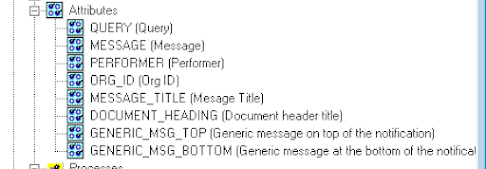
Create attributes:


Attributes that are text:

QUERY
PERFORMER
MESSAGE_TITLE
DOCUMENT_HEADING
GENERIC_MSG_TOP
GENERIC_MSG_BOTTOM ​

ORG_ID is a numeric attribute

MESSAGE is a Document. This is the most important attribute as it contains the message displayed in the notification:


Now define the GENERIC_MSG itself


&MESSAGE_TITLE in the subject and &MESSAGE in the HTML body


For the message to work drag the top MESSAGE_TITLE and MESSAGE attributes to attach them to the message itself.


The GENERIC_NTF notification needs to have the Generic Message attaches to it.


Now it is time to build the Process.
Double click the Universal Notification icon


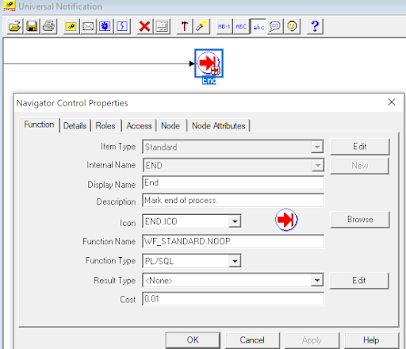
The drag the Start and End Function in there. The easiest way is to copy them from the "Standard" workflow item type but you can define them from scratch here as well.


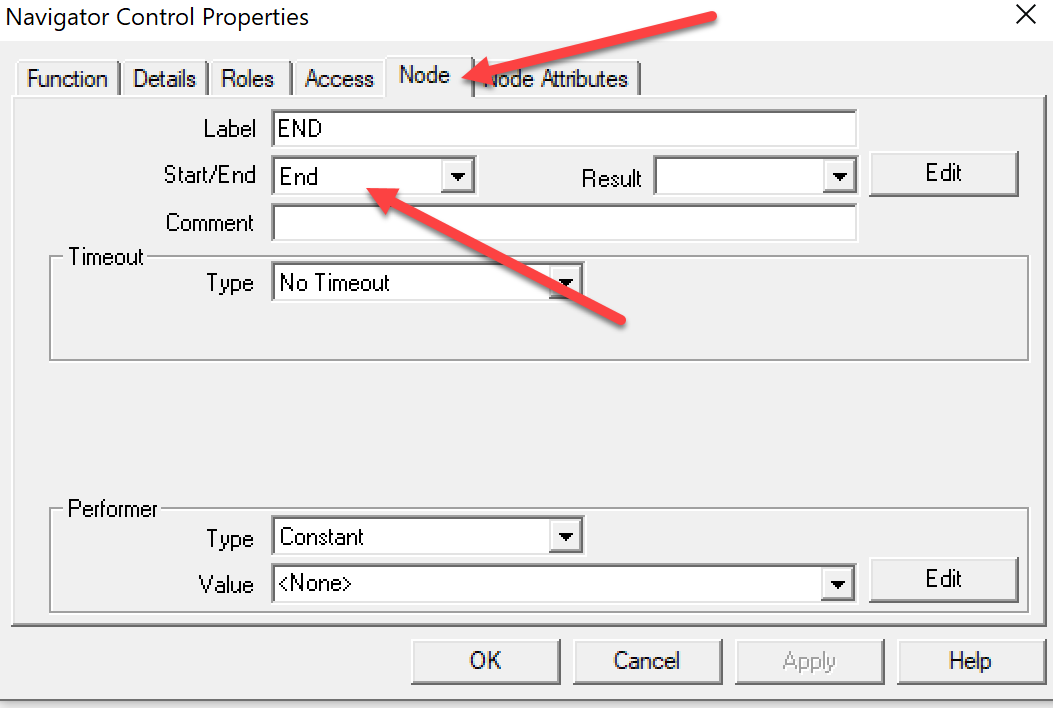
It is important to designate this function as "Start" in the node tab or the workflow will not work


Same with the End function:


Drag the newly defined notification into the process and join it to the start and end by holding the mouse right button. 

The notification must have the performer sourced form the item attribute named Performer


Enjoy!


Tuesday, October 6, 2020

The system cannot determine the default tax rate

 Have you encountered the below error when trying to cancel a Sales Order?

"Error: The system cannot determine the default tax rate for tax CITY and tax status STANDARD. Please contact your tax manager either to specify a default tax rate code for this tax status and date &DATE or to define appropriate rate determination rules. (TAX_DET_DATE=20-DEC-19)"

This is an extremely frustrating feature in EBS as the documentation does not give any reasonable clue  why this is happening and besides, what do we care about the tax rate when the order is to be cancelled anyway?

I tried to find where the TAX_DET_DATE comes from and it seemed like this should be the TAX_DATE from OE_ORDER_LINES_ALL.


Well, it is not.


It is PROMISE_DATE from OE_ORDER_LINES_ALL.


This is beyond silly, but when I pointed this out to DEV they just shrugged and said that works as designed. 

Anyway, change the Promise Date on your order lines to be today any you will be able to cancel the order.

Thursday, July 2, 2015

Calling Oracle forms documents form non EBS applications, i.e. OBIEE

Few days ago my colleague while browsing through OBIEE dashboards commented that it would be nice to be able to  click on an invoice on a detailed view and open the actual document.

Well, there is a way to do just that. 

Oracle has a nice document "Integrating Oracle Business Intelligence Applications with Oracle E-Business Suite (Doc ID 555254.1)"

It says:
"In order to generate an Action Link you will first have to do the following:
  1. Identify the Oracle E-Business Suite Application page/function that you want to link to. Obtain the function_id of that page and identify the querystring parameters required by that page. This will have to be done by going through Oracle E-Business Suite documentation."
That's good to know, but ... there is no documentation on it.

In the same note they describe function 

FND_RUN_FUNCTION.get_run_function_url(form function id, resp appl id, resp id, sg id, form params)

Which generates URL to a specific document that can be opened from browser window. That link can be added as a hyperlink to a non web based application and clicking it will bring up the  specific document within EBS. This is a gold mine, and a way to improve efficiency of work, but how do I know how to pass the parameters?

The first parameter is the form function id. This can be retrieved by running fnd_function.get_function_id('function name'). 

Example:

Select fnd_function.get_function_id('AR_ARXTWMAI_HEADER') from dual

The function name can be found by going to the specific form and following the steps below:

The second and third parameters, resp appl id, resp id can be found by going to:

Help -> Diagnostics -> Examine
Block: $PROFILES$
Fields: RESP_APPL_ID and RESP_ID

The last parameter, form params, is the hardest one, and without it the form will open but will not query a specific record.  Doc ID 555254.1 says to find the values by "going through Oracle E-Business Suite documentation", but no documentation exists in that regard. When I asked Oracle Support about it they were not aware of any.

Here is how I worked around it.

When you open a specific document, go to File menu and see if you can place it in navigator


Most of the major documents have this feature available.

When you do that the form will appear in the Documents tab of the EBS navigator


By itself it is no very useful, but clicking on the document will open the particular invoice. This means that the navigator passes the proper parameters to the form to open it. 

To capture those parameters enable forms trace by using instructions  from note 438652.1 section 2.2.
Those instruction are very comprehensive but most of the time it is sufficient to find the site value of the profile ICX: Forms Launcher and copy it to user profile appended with "?record=collect"

Example: https://hostname.domain:port/OA_HTML/frmservlet?record=collect

After setting up the profile option exit Oracle and log back it again for it to take effect.
Go to the Document added to the Navigator then double click on it. 

When done, retrieve the debug file located in $FORMS_TRACE_DIR 
and look for string "other_params"

Here is what I found for the AR invoice

AR_ARXTWMAI_HEADER open_flag: Y session_flag: Y other_params: FP_CUSTOMER_TRX_ID=647666 

This not only tells me the form parameters but also the name of the function, so I could have skipped the step above to find the name. 

Here is what it is for Purchase Order

Executing function: PO_POXPOEPO open_flag: Y session_flag: Y other_params: PO_HEADER_ID= 213180 ACCESS_LEVEL_CODE="MODIFY" POXPOEPO_CALLING_FORM="DESKTOP" 

Now I have all the needed parameters I can call my function:

For AR Invoice:

 select FND_RUN_FUNCTION.get_run_function_url(fnd_function.get_function_id('AR_ARXTWMAI_HEADER'), 222, 20678, 0,'FP_CUSTOMER_TRX_ID='||CUSTOMER_TRX_ID) from RA_CUSTOMER_TRX_All

This query creates URL to every single customer invoice. You can copy and paste it into browser and it will open the invoice. If you are not logged in it will prompt you to log in before opening the document. You must have access to the responsibility or the document will produce no access error. 

Here is syntax for other sample documents, make sure to replace the resp_appl_id and resp_id before running it on your system:

-- Purchase Order(Purchasing Superuser)
select FND_RUN_FUNCTION.get_run_function_url(fnd_function.get_function_id('PO_POXPOEPO'), 201, 20707, 0, 'po_header_id='||po_header_id||' ACCESS_LEVEL_CODE=MODIFY POXPOEPO_CALLING_FORM=DESKTOP') from po_headers_all

Note that I am passing all 3 required parameters for PO.  'po_header_id='||po_header_id||' ACCESS_LEVEL_CODE=MODIFY POXPOEPO_CALLING_FORM=DESKTOP'

Passing just the PO_HEADER_ID will not open the record

-- Quick Sales Order (Order Management Superuser)
select FND_RUN_FUNCTION.get_run_function_url(fnd_function.get_function_id('ONT_OEXOETEL'),660, 21623, 0, 'desktop_header_id='||header_id) from oe_order_headers_all 

Note that the correct parameter is "'desktop_header_id" not "header_id" which is an existing and intuitive parameter but using it will not open the form

--AP Invoices (Payables Manager)
 select FND_RUN_FUNCTION.get_run_function_url(fnd_function.get_function_id('AP_APXINWKB'), 200, 20639, 0,'INVOICE_ID='||invoice_id) from
AP_INVOICES_ALL

Even when a particular function cannot be placed on navigator, it may be still possible to get direct link to it, but it is harder to determine the right parameters. They can be determined by opening the form in Forms Developer and reading them from the triggers.  
The Org items and Material Workbench are examples of this scenario.

--Org Items (Inventory)
select FND_RUN_FUNCTION.get_run_function_url(fnd_function.get_function_id('INV_INVIDITM_ORG'), 401,  20634, 0,'chart_of_accounts_id=50348 org_id='||mp.organization_id||' item_id='||inventory_item_id||' org_code='||mp.organization_code)
 from mtl_system_items_b msi , mtl_parameters mp where msi.organization_id=mp.organization_id

--Material Workbench for an item and org (Inventory)
select FND_RUN_FUNCTION.get_run_function_url(fnd_function.get_function_id('INV_INVMATWB'), 401,  20634, 0,
'ORGANIZATION_ID='||organization_id||' INVENTORY_ITEM_ID='||inventory_item_id||' OWNING_QUERY_MODE=1 G_QUERY_FIND=FALSE')
from mtl_onhand_quantities
-- skip the organization_id if you want availability across orgs 

--Material transactions for Sales Order Issue, for specific item that not older than 3 months and not newer than one month (Inventory). This is an interesting example as it involves dates

SELECT FND_RUN_FUNCTION.get_run_function_url (
          fnd_function.get_function_id ('INV_INVTVTXN'),
          401,
          20634,
          0,
             'MODULE=CST FORM_USAGE_MODE=DSLA_DRILLDOWN INVTVTXN_GO_DETAIL=Y ORG_ID=102 INVTVTXN_INVENTORY_ITEM_ID='
          || inventory_item_id
          || ' INVTVTXN_TRXN_TYPE_ID=33 INVTVTXN_FROM_DATE='
          || SUBSTR (fnd_date.date_to_canonical (SYSDATE - 90),
                     1,
                       INSTR (fnd_date.date_to_canonical (SYSDATE - 90),
                              ' ',
                              1,
                              1)
                     - 1)
          || ' INVTVTXN_TO_DATE='
          || SUBSTR (fnd_date.date_to_canonical (SYSDATE - 30),
                     1,
                       INSTR (fnd_date.date_to_canonical (SYSDATE - 30),
                              ' ',
                              1,
                              1)
                     - 1))
  FROM mtl_system_items_b
 WHERE organization_id = 102 AND segment1 = 'XFR0150R240R'


--WiP Jobs

SELECT FND_RUN_FUNCTION.get_run_function_url (
          fnd_function.get_function_id ('WIP_WIPDJMDF_DEFINE'),
          706, 20560,
          0,
             'GID="'
          || wip_entity_id
          || '" ORG_ID="'
          || organization_id
          || '"')

  FROM wip_discrete_jobs where trunc(creation_date)=trunc(sysdate)


Using those URLs you can integrate third party applications with EBS, but you can also use the same parameters to create personalizations to call one Oracle form another from using the "Launch a Function" builtin.

Here is a proof of concept, you can use variables instead of the fixed values but the principle remains the same.


Click on Apply Now and the item form will open


A problem with calling Oracle from from an URL is that if you already have EBS open the URL may hijack the current session and hard close all the documents on the screen while keeping them locked.

To avoid that use this syntax when calling the URL from a third application:

href="http://url_from_above_queries_here"
target="_blank" name="Option" value="-noframemerging"


Opening the URL with the -nonframemerging option in IE will force a new EBS window to open.


Sunday, May 17, 2015

Email override for concurrent request Delivery Options

R12 offers a great feature sending emails directly from Concurrent Requests using Delivery Options.
Gone are the days where one had to build a new workflow and create a role to email a document to external party. With BI publisher the emails can be very fancy containing colors, graphics end everything else as long as MS Word and HTML can take it.

But adding this new great feature oracle broke something else. The Workflow Email Override Address does not  apply to the Delivery Options and that means that one can send external emails form a cloned test instance. As you can imagine the consequences can be disastrous, i.e. we have a scheduled concurrent requests that email customers the AR invoices. Now if someone started testing AR invoices in the clone instance...

Some companies worked around the issue by blocking the email functionality on clone instances. That works but now one can't properly test the new workflow emails nor concurrent request emails. So there are 3 options:

- you can deploy new functionality related to workflow or concurrent request emailing but risk that critical documents such as invoices get emailed to customers from the cloned instance
- do not deploy any new functionality
- deploy in PROD but without complete test cycle

Surprisingly, Oracle DEV being the siloed organization they are, looked only at the Delivery Option side of the coin and recognized the need as an enhancement request #9308736. ERs are nice but they can take years to deploy, it is 2015 and and couple of  ERs I created in 2002 and 2004 were just recently released.

If waiting 10 or 15 years is not an option for your organization here is how you can fix the issue:


  • Create an email address where the string is equal to the SID of the test database and get access to the email box. It would have this format: TEST@yourcompanyname.com. Replace the values with proper SID and domain names
  • Add this script to the cloning process. The script needs to be incorporated as integral part of the cloning process and executed after the SID has been already changed form prod to the test instance, but before concurrent manager is brought up:
-- this script must be executed
-- after the NAME column has been set in V$DATABASE to the correct clone instance
-- but before concurrent managers get up

--This section sets the workflow email override address to
--be equal to the SID of the test instance @yourcompanyname.com

update fnd_svc_comp_param_vals set parameter_value=(select name from v$database)||'@'||'yourcompanyname.com'
where parameter_id =(select parameter_id from fnd_svc_comp_params_tl where display_name = 'Test Address' );

commit;

-- This section updates all the concurrent requestsincluding those that are scheduled or were being
-- executed when the instance was cloned

-- It updates the email address of every request to eb that of the workflow email override
  update  fnd_conc_pp_actions set argument3=
  ( select fscpv.parameter_value  -- go to workflow override email address
    from fnd_svc_comp_params_tl fscpt
    ,fnd_svc_comp_param_vals fscpv
    where fscpt.display_name = 'Test Address'
    and fscpt.parameter_id = fscpv.parameter_id),
    argument4=( select fscpv.parameter_value  -- go to workflow override email address
    from fnd_svc_comp_params_tl fscpt
    ,fnd_svc_comp_param_vals fscpv
    where fscpt.display_name = 'Test Address'
    and fscpt.parameter_id = fscpv.parameter_id),
    argument5=null,
    argument6=null,
    argument8=null,
    argument9=null,
    argument10=null
    where ACTION_TYPE =7 ;

commit;


  • Create trigger on the FND_CONC_PP_ACTIONS table to update any email specified by user during new request submission to the email override. This script needs to be executed at the same time as the previous one

CREATE OR REPLACE TRIGGER XX_EMAIL_OVERRIDE
BEFORE INSERT or UPDATE
   ON fnd_conc_pp_actions
  FOR EACH ROW
DECLARE

-- This trigger overrides send to  email address  on non production Oracle servers
v_override_email varchar2(100);
v_instance varchar2(100); -- name of the oracle instance 

BEGIN

select name 
into v_instance
 from v$database;
If v_instance!='PROD' -- name of production instance, replace as appropriate
-
 then 
 BEGIN

if :new.ACTION_TYPE =7 -- if the request output is going to be emailed in post processing
 --if :new.ARGUMENT1 ='E' -- if the request output is going to be emailed in post processing
 then
 select decode(fscpv.parameter_value,'NONE',null,fscpv.parameter_value)  -- go to workflow override email address
 into v_override_email 
    from fnd_svc_comp_params_tl fscpt 
    ,fnd_svc_comp_param_vals fscpv 
    where fscpt.display_name = 'Test Address' 
    and fscpt.parameter_id = fscpv.parameter_id;
    
        
   -- if v_override_email!='NONE' then -- if workflow override email is set

:new.ARGUMENT3:=v_override_email; --override sender address
:new.ARGUMENT4:=v_override_email;  -- send the email to the work from over
:new.ARGUMENT5:=null;--delete any addtional cc email addresses
:new.ARGUMENT6:=null;
:new.ARGUMENT7:=null;
:new.ARGUMENT8:=null;
:new.ARGUMENT9:=null;
:new.ARGUMENT10:=null;


--end if; -- end for override email is !='NONE'

end if; -- end of if the output is to be emailed 

EXCEPTION
   WHEN OTHERS
   then null;
   
END;

end if; -- end if the instance is not PROD

EXCEPTION
   WHEN OTHERS
   then null;
   
END;


Monday, January 19, 2015

Ship Sets on Internal and EDI orders

In some cases customers require their shipments to be complete rather than shipped piecemeal. In other cases it is efficient to organize picking work around picking and packing the complete delivery, rather than each line separately.

To address those needs you can use ship sets on Oracle OM lines. All lines belonging to the same ship set will not be released for picking until every single line in the set has full quantity available. In most organizations the largest shipments are replenishments to remote branches, but out of the box there is no way to add a ship set to a manually created internal requisition line or one released from the ASCP plan. This means that the largest shipments cannot be easily consolidated for picking and packing unless someone queries the internal order and adds the ship sets manually after they are created. This is mightily inconvenient if you ask me.

To remedy this problem one might be tempted to simply add a trigger on the OE_LINES_IFACE_ALL to add the ship set. Unfortunately this is is not that simple as single internal order my contain multiple ship sets. An internal order may ship from and to multiple locations and we don't want to pick and pack together items that will have to be dispatched to different destinations. Even within a single destinations we may have requirements to ship on different days and have to have different ship set for each day. There may be additional criteria such as shipping priority or shipping method that drives separate deliveries from a single order.

We can't evaluate all the lines on an order for those conditions before they are all completely inserted making a potential trigger on OE_LINES_IFACE_ALL useless.

Ideally we would put a trigger on OE_HEADERS_IFACE_ALL but the header is inserted before the lines...

Fortunately the Order Import concurrent job updates the OE_HEADERS_IFACE_ALL with the request_id, before even looking at the lines. This is an ideal time point to evaluate all the lines for ship set application, as at this point we know the lines are all complete and their number or data will not have any more inputs.

Here is sample code of an After Update trigger on OE_HEADERS_IFACE_ALL.  In addition to checking the dates and shipping warehouse, it checks if the customer (internal for IR/ISO or external for EDI) has ship sets enforced on the customer or site level. This allows putting tailored ship sets to some customers and none to others, depending on the setup preferences.

CREATE OR REPLACE TRIGGER XX_SHIP_SET_IFACE
AFTER UPDATE
   ON OE_HEADERS_IFACE_ALL
  FOR EACH ROW
DECLARE

-- This trigger is intended to create different ship sets per Request Date and warehouse for each order imported thru the interface
-- The update is in AFTER Update trigger since every time an order is procesed the OE_HEADERS_IFACE_ALL gets updated with the processing concurrent request ID.
-- At this point the lines are all completly in the OE_LINES_IFACE_ALL tabel and can be groupped into ship sets

cursor c is
  SELECT ol.ORIG_SYS_DOCUMENT_REF, ol.REQUEST_DATE, ol.SHIP_FROM_ORG_ID  -- internal order ship set grouping rules
    FROM OE_LINES_IFACE_ALL ol, po_requisition_lines_all prl
   WHERE ol.ORIG_SYS_DOCUMENT_REF =:new.ORIG_SYS_DOCUMENT_REF
   and order_source_id=10 -- internal orders
   and ol.ORIG_SYS_LINE_REF=to_char(prl.REQUISITION_LINE_ID)
 GROUP BY ol.ORIG_SYS_DOCUMENT_REF,
         ol.SHIP_SET_NAME,
         ol.SHIP_FROM_ORG_ID,
         ol.REQUEST_DATE,
         prl.attribute1
UNION all
  SELECT ol.ORIG_SYS_DOCUMENT_REF, ol.REQUEST_DATE, ol.SHIP_FROM_ORG_ID -- EDI orders
    FROM OE_LINES_IFACE_ALL ol
   WHERE ol.ORIG_SYS_DOCUMENT_REF =:new.ORIG_SYS_DOCUMENT_REF
   and order_source_id!=10
GROUP BY ol.ORIG_SYS_DOCUMENT_REF,
         ol.SHIP_SET_NAME,
         ol.SHIP_FROM_ORG_ID,
         ol.REQUEST_DATE
Order by REQUEST_DATE;

cursor ship_set is -- check if the ship sets are enforeced on site or customer level
select 0 from  dual where exists
(select 0 from
hz_cust_site_uses_all
where site_use_id =:new.ship_to_org_id
and SHIP_SETS_INCLUDE_LINES_FLAG='Y'
union all
select 0 from
 hz_cust_accounts_all
where CUST_ACCOUNT_ID =:new.sold_to_org_id
and SHIP_SETS_INCLUDE_LINES_FLAG='Y');


i number;

BEGIN
 i:=0;

 for z in ship_set loop --only for sites with enabled ship sets

 for r in c loop -- loop thru each combination of request date and warehouse within each order header

 i:=i+1;

 update OE_LINES_IFACE_ALL
 set SHIP_SET_NAME=to_char(i)
 where ORIG_SYS_DOCUMENT_REF=r.ORIG_SYS_DOCUMENT_REF
 and nvl(REQUEST_DATE, trunc(sysdate))=nvl(r.REQUEST_DATE, trunc(sysdate))
 and nvl(SHIP_FROM_ORG_ID,0)= nvl(r.SHIP_FROM_ORG_ID,0);


 end loop;

 end loop;


EXCEPTION
   WHEN OTHERS
   then null; -- if ship sets cannot be added the order is still good to go

END;
/

Tuesday, December 16, 2014

Correct unbalanced subledger entries

Here  a practical application of the function xx_ccID.switch_CCID_segment  used to correct entries in the Inventory and WiP subledgers where Debit and Credit are posted to accounts with different balancing segments.

This problem generates this error when running the Create Accounting in Cost Management - SLA

Message : The Legal Entity segment value for the account code combination
() specified in line () is not assigned to the ledger ()
Please update the Legal Entity segment value assignments for the ledger in the Accounting
Configuration page or use another Legal Entity segment value.

Description of the fix:

The first cursor establishes list of transactions where the segments are mismatching.

The second cursor loops through each of those transactions and finds the entry where the balancing segment of the associated legal entity does not match the balancing segment of the entry, then corrects it using the xx_ccID.switch_CCID_segment function described in my previous post.

Optionally it moves the transaction to the  current accounting period to make sure the period is not closed.

This is a relatively simple script with 2 important assumptions:


  • The entry with wrong balancing segment has all the other segments correct. This  is probably true more often than not, but doesn't have to be. It depends on the nature of the problem. If, in example, the offsetting account for cost adjustment was typed in wrong, changing just the balancing segment may actually make things worse as the fix will post the entries to a valid but wrong account. 
  • All operating units reside in separate legal entities or have the same balancing segment if they reside in one legal entity. This is true in most implementations but not in all.


The actual code for Inventory subledger:

Declare

v_transaction_id number;
--v_COA number;
v_correct_account number;
i number;
j number;

cursor a is -- find all the material transactions that have balancing segment mismatch between CR and DT
-- this is to speed up cursor b
select distinct a.transaction_id from
mtl_transaction_accounts a, mtl_transaction_accounts b,
gl_code_combinations ac, gl_code_combinations bc
where
a.transaction_id=b.transaction_id
and a.reference_account=ac.CODE_COMBINATION_ID
and b.reference_account=bc.CODE_COMBINATION_ID
and ac.segment1!=bc.segment1;

cursor b is -- find the actual accounting entries for material trx from previous cursor
select mta.transaction_id, mta.inv_sub_ledger_id, gcc.chart_of_accounts_id, fnd_flex_ext.get_segs ('SQLGL',
                                'GL#',
                                gcc.chart_of_accounts_id,--v_COA,
                                xal.CODE_COMBINATION_ID) account, gle.FLEX_SEGMENT_VALUE org_balancing_segment,
                                xal.accounting_class_code,
                                 mta.reference_account, xah.ae_header_id, xal.ae_line_num,
                                 qa_moac_pkg.derive_ou_id(mmt.organization_id),
                                 mta.transaction_date, xah.ACCOUNTING_DATE, xah.period_name, xe.event_id, xe.APPLICATION_ID
                                  from
XLA_DISTRIBUTION_LINKS xdl,
XLA_AE_HEADERS xah,
XLA_AE_LINES xal,
XLA_EVENTS xe,
MTL_TRANSACTION_ACCOUNTS  mta,
mtl_material_transactions mmt,
hr_organization_information hoi,
gl_legal_entities_bsvs  gle,
gl_code_combinations gcc
where
xdl.source_distribution_type = 'MTL_TRANSACTION_ACCOUNTS'
and xdl.source_distribution_id_num_1(+) = mta.inv_sub_ledger_id
and xah.ae_header_id(+) = xdl.ae_header_id
and  xdl.ae_line_num = xal.ae_line_num(+)
and xah.application_id = xal.application_id
and xah.ae_header_id = xal.ae_header_id
and xe.application_id=xah.application_id
and xe.event_id=xah.event_id
and mta.transaction_id=mmt.transaction_id(+)
and hoi.organization_id(+) = mmt.organization_id
and hoi.org_information_context = 'Accounting Information'
and to_number(hoi.ORG_INFORMATION2)=gle.LEGAL_ENTITY_ID(+)
and mta.reference_account=gcc.code_combination_id
and substr(fnd_flex_ext.get_segs ('SQLGL',
                                'GL#',
                                gcc.chart_of_accounts_id,--v_COA,
                                xal.CODE_COMBINATION_ID),1,length(gle.FLEX_SEGMENT_VALUE))!=gle.FLEX_SEGMENT_VALUE --code combination starts with wrong balancing segment
and
 mta.transaction_id =v_transaction_id;


BEGIN

i:=0;


for x in a loop
v_transaction_id:=x.transaction_id;

for y in b loop
i:=i+1;
v_correct_account:=XX_CCID.switch_CCID_segment(y.reference_account,
y.chart_of_accounts_id,
1,
y.org_balancing_segment,'.'); -- get the CCID with correct balancing segment

dbms_output.put_line('---------------------------');
dbms_output.put_line('transaction_Id= '||y.transaction_id);
dbms_output.put_line('balancing segment ='||y.org_balancing_segment);
dbms_output.put_line('original account = '||fnd_flex_ext.get_segs ('SQLGL',
                                'GL#',
                                y.chart_of_accounts_id,--v_COA,
                                y.reference_account));
dbms_output.put_line('corrected account = '||fnd_flex_ext.get_segs ('SQLGL',
                                'GL#',
                                y.chart_of_accounts_id,--v_COA,
                                v_correct_account));
dbms_output.put_line('corrected account = '||fnd_flex_ext.get_segs ('SQLGL',
                                'GL#',
                                y.chart_of_accounts_id,--v_COA,
                                v_correct_account));
dbms_output.put_line('original period = '||y.period_name);


--update the base accounting table
update mtl_transaction_accounts
set reference_account=v_correct_account
where inv_sub_ledger_id=y.inv_sub_ledger_id;

-- update the subledger acct tabels to keep them in sync
update XLA_AE_LINES set CODE_COMBINATION_ID=v_correct_account
where ae_header_id=y.ae_header_id
and AE_LINE_NUM=y.AE_LINE_NUM;

-- optional date update so that the transaction moves to the current accounting period
update xla_events set
event_date =sysdate,
 REFERENCE_DATE_1 =sysdate,
last_updated_by=2021,
last_update_date=sysdate
where event_id=y.event_id
and application_id=y.application_id;


end loop;
end loop;

dbms_output.put_line('  ');
dbms_output.put_line('============================== ');
dbms_output.put_line('total number of corrected entries = '||i);

rollback; -- change this to Commit; during final execution

END;

and for the WIP subledger

Declare

v_transaction_id number;
v_COA number;
v_correct_account number;
i number;
j number;

cursor a is -- find all the wip transactions that have balancing segment mismatch between CR and DT
-- this is to speed up cursor b
select distinct a.transaction_id from
WIP_transaction_accounts a, WIP_transaction_accounts b,
gl_code_combinations ac, gl_code_combinations bc
where
a.transaction_id=b.transaction_id
and a.reference_account=ac.CODE_COMBINATION_ID
and b.reference_account=bc.CODE_COMBINATION_ID
and ac.segment1!=bc.segment1;

cursor b is -- find the actual accounting entries for material trx from previous cursor
select mta.transaction_id, mta.wip_sub_ledger_id, gcc.chart_of_accounts_id, fnd_flex_ext.get_segs ('SQLGL',
                                'GL#',
                                gcc.chart_of_accounts_id,--v_COA,
                                xal.CODE_COMBINATION_ID) account, gle.FLEX_SEGMENT_VALUE org_balancing_segment,
                                xal.accounting_class_code,
                                 mta.reference_account, xah.ae_header_id, xal.ae_line_num,
                                 qa_moac_pkg.derive_ou_id(mmt.organization_id),
                                 mta.transaction_date, xah.ACCOUNTING_DATE, xah.period_name, xe.event_id, xe.APPLICATION_ID
                                  from
XLA_DISTRIBUTION_LINKS xdl,
XLA_AE_HEADERS xah,
XLA_AE_LINES xal,
XLA_EVENTS xe,
WIP_TRANSACTION_ACCOUNTS  mta,
wip_transactions mmt,
hr_organization_information hoi,
gl_legal_entities_bsvs  gle,
gl_code_combinations gcc
where
xdl.source_distribution_type = 'WIP_TRANSACTION_ACCOUNTS'
and xdl.source_distribution_id_num_1(+) = mta.wip_sub_ledger_id
and xah.ae_header_id(+) = xdl.ae_header_id
and  xdl.ae_line_num = xal.ae_line_num(+)
and xah.application_id = xal.application_id
and xah.ae_header_id = xal.ae_header_id
and xe.application_id=xah.application_id
and xe.event_id=xah.event_id
and mta.transaction_id=mmt.transaction_id(+)
and hoi.organization_id(+) = mmt.organization_id
and hoi.org_information_context = 'Accounting Information'
and to_number(hoi.ORG_INFORMATION2)=gle.LEGAL_ENTITY_ID(+)
and mta.reference_account=gcc.code_combination_id
and substr(fnd_flex_ext.get_segs ('SQLGL',
                                'GL#',
                                gcc.chart_of_accounts_id,--v_COA,
                                xal.CODE_COMBINATION_ID),1,length(gle.FLEX_SEGMENT_VALUE))!=gle.FLEX_SEGMENT_VALUE --code combination starts with wrong balancing segment
and
 mta.transaction_id =v_transaction_id;


BEGIN

i:=0;


for x in a loop
v_transaction_id:=x.transaction_id;

for y in b loop
i:=i+1;
v_correct_account:=XX_CCID.switch_CCID_segment(y.reference_account,
y.chart_of_accounts_id,
1,
y.org_balancing_segment,'.'); -- get the CCID with correct balancing segment

dbms_output.put_line('---------------------------');
dbms_output.put_line('transaction_Id= '||y.transaction_id);
dbms_output.put_line('balancing segment ='||y.org_balancing_segment);
dbms_output.put_line('original account = '||fnd_flex_ext.get_segs ('SQLGL',
                                'GL#',
                                y.chart_of_accounts_id,--v_COA,
                                y.reference_account));
dbms_output.put_line('corrected account = '||fnd_flex_ext.get_segs ('SQLGL',
                                'GL#',
                                y.chart_of_accounts_id,--v_COA,
                                v_correct_account));
dbms_output.put_line('corrected account = '||fnd_flex_ext.get_segs ('SQLGL',
                                'GL#',
                                y.chart_of_accounts_id,--v_COA,
                                v_correct_account));
dbms_output.put_line('original period = '||y.period_name);


--update the base accounting table
update WIP_transaction_accounts
set reference_account=v_correct_account
where WIP_SUB_LEDGER_ID=y.WIP_SUB_LEDGER_ID;

-- update the subledger acct tabels to keep them in sync
update XLA_AE_LINES set CODE_COMBINATION_ID=v_correct_account
where ae_header_id=y.ae_header_id
and AE_LINE_NUM=y.AE_LINE_NUM;

-- optional date update so that the transaction moves to the current accounting period
update xla_events set
event_date =sysdate,
 REFERENCE_DATE_1 =sysdate,
last_updated_by=2021,
last_update_date=sysdate
where event_id=y.event_id
and application_id=y.application_id;


end loop;
end loop;

dbms_output.put_line('  ');
dbms_output.put_line('============================== ');
dbms_output.put_line('total number of corrected entries = '||i);

rollback; -- change this to Commit; during final execution

END;